Posts

Showing posts matching the search for x60s

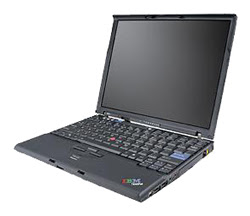
Triple-Boot Thinkpad x60s
Image
Many years ago I thought multibooting operating systems was quite the cool thing to do. This was before VMware when my budget was tighter and so was my living space. Recently with my new laptop configuration I moved to an all-Ubuntu setup, upon which I loaded VMware Server. VMware Server had Windows XP and FreeBSD 6.2 VMs at its disposal. I've spent nearly all my time in Ubuntu, never really needing to turn to Windows or FreeBSD for desktop work. With the arrival of Ubuntu 7.04, I decided to try a new approach with my laptop. The OEM HDD was 60 GB, which is somewhat small given my use of VMs. Furthermore, I fairly regularly buy brand new hard drives when I make major operating system shifts. I think the best backup I could ever have is an entire old hard drive, and HDDs are cheap compared to the value of the data on them. Moving from 6.10 to 7.04 seemed like a good time to replace the 60 GB HDD with a Seagate Momentus 5400.3 ST9160821AS 160GB 5400 RPM 8MB Cache Serial ATA1...

Troubleshooting FreeBSD Wireless Problem

Image
My main personal workstation is a Thinkpad x60s . As I wrote in Triple-Boot Thinkpad x60s , I have Windows XP, Ubuntu Linux, and FreeBSD installed. However, I rarely use the FreeBSD side. I haven't run FreeBSD on the desktop for several years, but I like to keep FreeBSD on the laptop in case I encounter a situation on the road where I know how to solve a problem with FreeBSD but not Windows or Linux. (Yes I know about [insert favorite VM product here]. I use them. Sometimes there is no substitute for a bare-metal OS.) When I first installed FreeBSD on the x60s (named "neely" here), the wireless NIC, an Intel(R) PRO/Wireless 3945ABG, was not supported on FreeBSD 6.2. So, I used a wireless bridge. That's how the situation stayed until I recently read M.C. Widerkrantz's FreeBSD 7.2 on the Lenovo Thinkpad X60s . It looked easy enough to get the wireless NIC running now that it was supported by the wpi driver. I had used freebsd-update to upgrade the 6.2 to ...

External Monitor on X60s

I decided today to test support for external monitors on my Thinkpad X60s. I figured it was a good idea to make sure it worked before trying to deliver a presentation. It turns out I could not use FN+F7 to send the display to an external monitor. However, I did find a document that recommended making the following modification to xorg.conf. It sends display to the LCD and the VGA out simultaneously. richard@neely:/etc/X11$ diff -u xorg.conf.orig xorg.conf --- xorg.conf.orig 2007-03-01 10:43:11.000000000 -0500 +++ xorg.conf 2007-03-01 10:37:47.000000000 -0500 @@ -103,6 +103,8 @@ Identifier "Intel Corporation Mobile Integrated Graphics Controller" Driver "i810" BusID "PCI:0:2:0" +Option "Clone" "yes" +Option "MonitorLayout" "CRT,LFP" EndSection Section "Monitor" Now when I attach a monitor to the VGA port, the laptop can be seen on it.

New Laptop Configuration

Last year I bought a Lenovo X60s laptop to serve as a portable VMware server for my classes. Recently my seven-year-old Thinkpad a20p has been giving me trouble, like losing half its RAM. When you only have 512 MB, that's a big deal. I decided that it was time to move operations to the newer laptop, even though the screen is smaller than I prefer for daily use. I figure I can get by with the smaller screen at least through the end of the year, when I hope to buy my next dream laptop . I decided this was the time to try a new laptop configuration. The X60s came with Windows XP SP2 preinstalled. Although the bottom of the laptop showed a product key, I used the Magical Jelly Bean Keyfinder v2.0 Beta 2½ to retrieve the key used by Windows internally. I installed Ubuntun Desktop 6.10 but preserved the 5 GB IBM restore partition. I am really impressed by Ubuntu. I never use configuration GUIs for anything, but I did use Ubuntu's to set up wireless networking prior to the ...

Burning CDs on Ubuntu

Sometimes this blog is just a place for me to take notes on tasks I want to repeat in the future, like burning CDs. In this case I'm running Ubuntu and using the new portable Sony DRX-S50U Multi-Format DVD Burner I bought to accompany my Thinkpad x60s on the road. First I created an .iso of the files I wanted on the CD-R. richard@neely:/var/tmp$ mkisofs -J -R -o /data/shmoocon2007hack.iso shmoocon2007/ INFO: UTF-8 character encoding detected by locale settings. Assuming UTF-8 encoded filenames on source filesystem, use -input-charset to override. Using shmoo000.pca;1 for /shmoocon_hack_rd2_timeadj.pcap (shmoocon_hack_rd1_timeadj.pcap) 1.68% done, estimate finish Wed Apr 11 21:23:45 2007 ...truncated... Second I asked cdrecord to find the burner. richard@neely:/var/tmp$ sudo cdrecord -scanbus Cdrecord-Clone 2.01.01a03 (i686-pc-linux-gnu) Copyright (C) 1995-2005 Joerg Schilling NOTE: this version of cdrecord is an inofficial (modified) release of cdrecord ...

VMware Server 1.0.2 on Ubuntu 6.10

Previously I documented installing VMware Workstation 6 Beta on my Thinkpad x60s. I decided to uninstall Workstation and install VMware Server 1.0.2. I should have used the vmware-uninstall.pl script but even without using it directly I managed to remove the old Workstation installation without real trouble. Running Server on Ubuntu 6.10 (desktop) required me to add a few packages. I found Martti Kuparinen 's installation guide very helpful. I had to add the following packages to ensure a smooth Server installation. sudo apt-get install xinetd sudo apt-get install libX11-dev sudo apt-get install xlibs-dev I did not have to install linux-kernel-headers. I was really impressed that Martti provided a patch for two scripts that did not work correctly out of the box. When I applied the patch I was able to start VMware's Web server and access it via my browser. richard@neely:/tmp$ wget http://users.piuha.net/martti/comp/ubuntu/httpd.vmware.diff --13:52:24-- http://users.piuha....

Wireless Ubuntu on Thinkpad x60s

I'm used to doing everything manually when running wireless FreeBSD on older laptops. Running Ubuntu has shielded me from some of the command-line configuration I used to perform on FreeBSD. Linux uses different commands for certain tasks. My new laptop also has a different chipset from my old laptop, so I wanted to see if I could get Kismet working on it. If I want to find wireless networks via the command line I use this command. richard@neely:~$ sudo iwlist eth1 scan eth1 Scan completed : Cell 01 - Address: 00:13:10:65:2F:AD ESSID:"shaolin" Protocol:IEEE 802.11bg Mode:Master Channel:1 Encryption key:on Bit Rates:1 Mb/s; 2 Mb/s; 5.5 Mb/s; 6 Mb/s; 9 Mb/s 11 Mb/s; 12 Mb/s; 18 Mb/s; 24 Mb/s; 36 Mb/s 48 Mb/s; 54 Mb/s Quality=76/100 Signal level=-58 dBm Noise...